Search Results:
Docker native linux networking
posted on 27 Jan 2026 under category network
Post Meta-Data
| Date | Language | Author | Description |
|---|---|---|---|
| 27.01.2026 | English | Claus Prüfer (Chief Prüfer) | Docker - A Professional Insight Into “Bridged” Networking (Linux) |
Docker - the Path towards Native Linux Networking
Contemporary container orchestration paradigms have fundamentally transformed infrastructure deployment methodologies. However, Docker’s default networking implementation frequently introduces superfluous complexity through its iptables integration and Network Address Translation (NAT) mechanisms. This article presents a systematic examination of techniques for achieving transparent Linux networking integration with Docker, thereby eliminating architectural complexity while simultaneously enhancing security posture and network isolation characteristics.

Docker Network Types: a Taxonomic Overview
Docker provides a variety of networking modes to accommodate diverse operational requirements. A comprehensive understanding of these configurations is essential prior to examining our bridged networking methodology:
Bridged Network
The default Docker network driver instantiates a software bridge on the host system. Containers connected to an identical bridge network can communicate directly, while Docker typically employs NAT for external connectivity. This represents the most prevalent and versatile network configuration.
Host Network
This mode eliminates network isolation between the container and the host system. The container directly shares the host’s network namespace, thereby providing optimal performance characteristics at the expense of isolation properties. This configuration is particularly suited for performance-critical applications requiring direct access to host network interfaces.
IPVlan
This driver creates virtual network interfaces possessing unique IP addresses while sharing the parent interface’s MAC address. It operates in either L2 (bridge-like) or L3 (routing) mode. This approach is optimal for environments requiring IP address conservation or scenarios involving numerous containers with distinct IP addresses.
MacVLAN
This driver assigns a unique MAC address to each container’s virtual network interface, thereby causing containers to manifest as physical devices on the network. It provides excellent performance characteristics and genuine network isolation, though it necessitates promiscuous mode support on the physical interface.
Primary Focus: Bridged Networking without Superfluous Complexity
This investigation focuses exclusively on the Bridged network type, demonstrating that through appropriate configuration, there exists no requirement for alternative network types—including the complex overlay networks utilised by Docker Swarm and comparable orchestration platforms.
Furthermore, this examination reveals the counterintuitive finding that disabling certain Docker security features (specifically iptables integration) actually facilitates superior security mechanisms through explicit network isolation implemented at the infrastructure level.
Addressing Common Misconceptions: the iptables Consideration
Rationale for iptables Integration
Docker’s default configuration incorporates automatic iptables rule management for the following purposes:
- NAT for outbound traffic routing
- Port mapping from host to containers
- Inter-container communication control
- Network isolation between Docker networks
Practitioners with extensive networking experience frequently inquire: “What is the rationale for NAT? Do alternative approaches exist?”
The Response: Indeed, They Exist
Docker’s iptables integration is not a mandatory requirement. Native Linux routing and bridging capabilities provide more transparent and predictable network behaviour. The iptables approach was selected for:
- Operational simplicity (functions without additional configuration on most systems)
- Default isolation properties
- Port mapping functionality
The Costs
However, this design choice incurs the following costs:
- Concealed network complexity
- Challenging connectivity troubleshooting
- Performance overhead
- Incompatibility with certain network configurations
The following sections demonstrate methodologies for bypassing these limitations entirely.
Prerequisite Configuration: Disabling iptables Integration
The initial step towards achieving native Linux networking involves disabling Docker’s iptables integration.
Configuration Procedure
Edit or create /etc/docker/daemon.json:
{
	"iptables": false
}
Applying Configuration Changes
Subsequent to modifying the configuration, restart the Docker daemon:
# On systemd-based systems
sudo systemctl restart docker
Restart the VM/host if necessary.
With iptables disabled, Docker will no longer automatically configure NAT rules or port mappings. The administrator assumes complete control over network routing and must configure it explicitly.
Disabling Packet Passing to Firewall Subsystems (Layer 2 and Layer 3)
Linux bridge interfaces can optionally pass packets through the iptables and ebtables firewall subsystems. For transparent networking implementations, it is desirable to disable this behaviour.
Kernel Configuration Parameters
Disable bridge packet filtering at the kernel level:
# Disable iptables processing for bridged IPv4 traffic
echo "0" > /proc/sys/net/bridge/bridge-nf-call-iptables

# Disable ebtables processing for bridged ARP traffic
echo "0" > /proc/sys/net/bridge/bridge-nf-call-arptables
Establishing Persistent Configuration
To ensure these settings persist across system reboots, add them to /etc/sysctl.d/net-bridge.conf:
net.bridge.bridge-nf-call-iptables = 0
net.bridge.bridge-nf-call-arptables = 0
Docker Inter-Network Routing Mechanisms
With iptables disabled, native Linux routing on the host becomes operational. This configuration enables sophisticated networking scenarios that were previously precluded by Docker’s default firewall rules.
Enabling IP Forwarding
IP forwarding must be enabled for the kernel to route packets between interfaces:
echo "1" > /proc/sys/net/ipv4/ip_forward
Resultant Network Behaviour
With this configuration:
- Containers in Docker network1 can communicate with network2 (and conversely)
- Incoming packets from external subnets will be forwarded to Docker containers
- The host functions as a standard Linux router
- All routing decisions conform to the kernel routing table
Architectural Diagram
The following diagram illustrates a routed Docker bridge configuration:
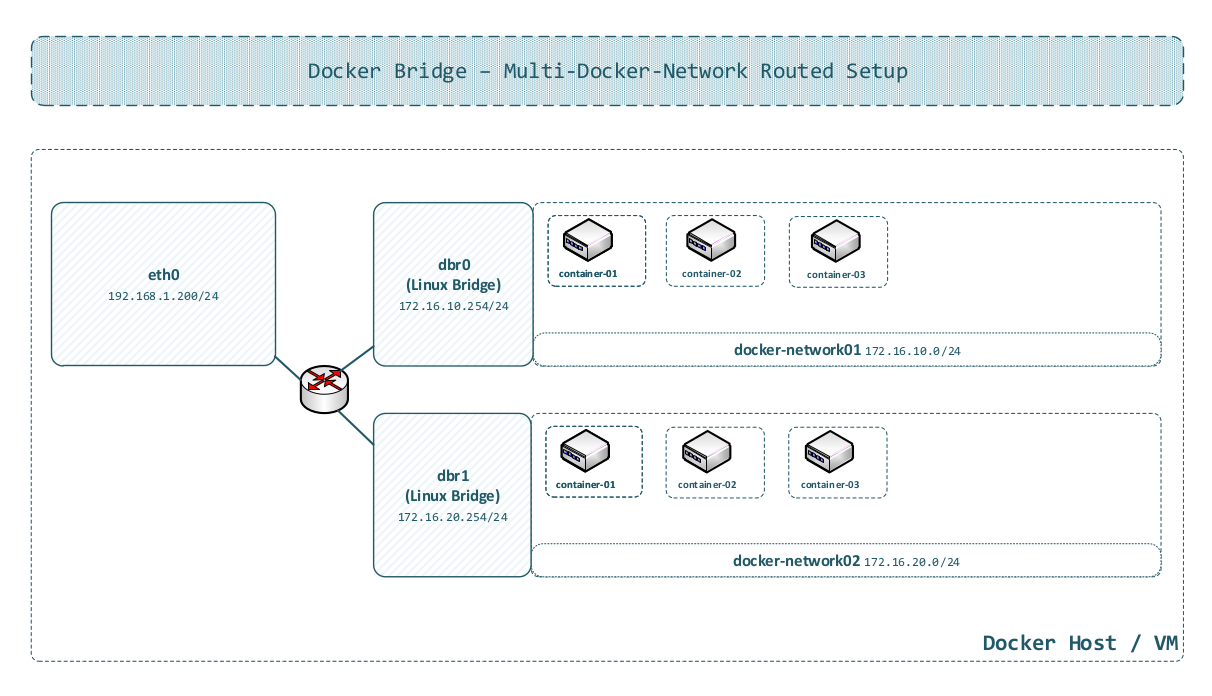
In this configuration:
- Multiple Docker bridge networks exist on the host
- The Linux kernel routes between them
- External networks can reach containers directly via routing
- No NAT is required for inter-network communication
Creating a Docker Network
The establishment of Docker networks with appropriate gateway configuration is essential for routed deployments.
Network Creation Command
docker network create \
  --subnet 172.16.10.0/24 \
  --gateway 172.16.10.254 \
  -o com.docker.network.bridge.enable_ip_masquerade=false \
  -o com.docker.network.bridge.name=br-dnw0 \
  dnw0
Parameter Specification
--subnet 172.16.10.0/24: Defines the network address range for containers--gateway 172.16.10.254: Establishes the default gateway for containers in this network-o com.docker.network.bridge.enable_ip_masquerade=false: Disables IP masquerading (NAT)-o com.docker.network.bridge.name=br-dnw0: Overrides the automatically generated Linux bridge namednw0: Network identifier
Application in Routed Environments
This configuration functions optimally in routed environments where:
- The host maintains routes to Docker subnets
- External routers possess knowledge of how to reach Docker networks via the host
- Direct IP communication is requisite
Consideration for Bridged Environments
In more complex external bridged configurations (examined in the subsequent section), network configuration necessitates additional adjustments. IP masquerading has been explicitly disabled, preventing NAT and enabling direct routing.
Simple External Bridged Configuration
A prevalent scenario involves Docker operating within a virtual machine, where the VM’s primary interface is bridged to an external physical switch connected to a router.
Configuration Prerequisites
Identical base settings to routed configuration:
- iptables disabled in Docker daemon
- Bridge netfilter disabled
Important Note
IP forwarding must be disabled by
echo "0" > /proc/sys/net/ipv4/ip_forward.
Additional requirement:
- The VM’s eth0 interface IP address must be removed or unset
- The eth0 interface joins the Docker bridge directly
Attaching eth0 to the Docker Bridge
# Add physical interface to Docker bridge (example: bridge named 'br-dnw0')
ip link set eth0 master br-dnw0
The Gateway Configuration Challenge
One might assume: “Simply add eth0 to the Docker bridge, and containers can reach the external router directly.” This assumption is nearly correct, but presents a critical issue:
The problem: Container gateway settings reference the Docker bridge’s host IP address (e.g., 172.16.10.253). However, in a bridged configuration, the correct gateway is the external router’s IP address (e.g., 172.16.10.254).
Resolution Approaches
Two methodological approaches exist:
Option 1: Bridged - Single Broadcast Layer-2 Segment (Recommended)
- External router as gateway for each container (must reside in the same subnet as containers)
- Create the Docker network with the external router’s IP as gateway
- Exclusively adding an IP address to the bridge interface enables host-to-container communication
The incorrect IP address assigned by Docker on the bridge interface must be manually replaced (there is currently no Docker option supporting this configuration).
Option 2: Routed - Multiple Subnets (Not Recommended)
- Retain the Docker bridge IP as the gateway
- The bridge interface routes traffic to the external network via eth0
- External incoming traffic must be routed to each network (consider a multi-datacenter scenario)
- Traffic isolation not achieved (in comparison to Option 1); Option 2 removes iptables isolation entirely
Architectural Diagram
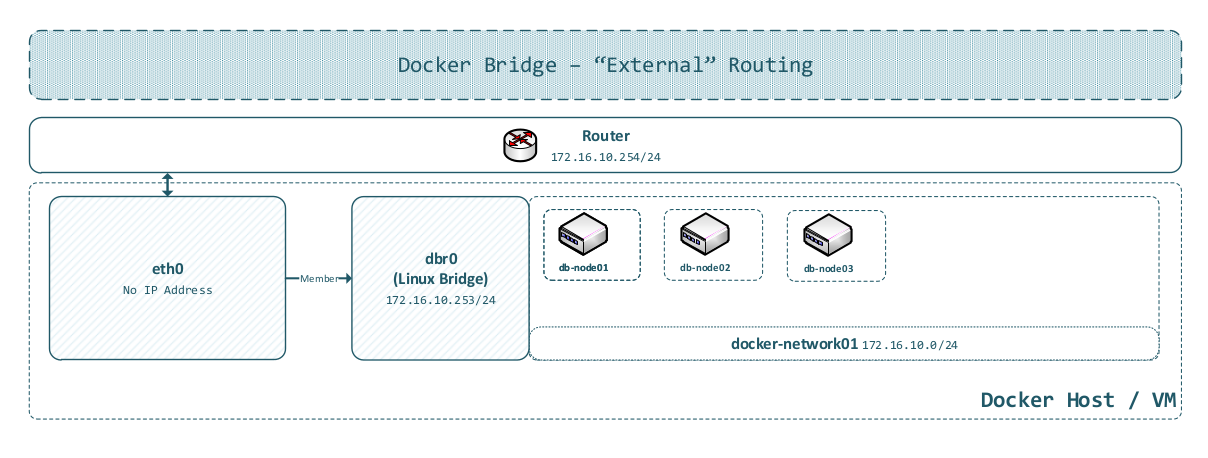
This diagram illustrates:
- VM’s eth0 interface bridged to Docker network
- No IP address on eth0 (purely Layer 2 operation)
- Docker bridge should not handle Layer 3 routing
- Containers communicate directly with the external network
Rationale for Docker’s Architectural Limitation
Docker’s “bridge” network configuration is designed for isolated networks with NAT, not transparent “bridging” to external networks. The gateway must invariably reside within the Docker-managed subnet, creating a conflict when attempting to bridge to existing external networks.
This limitation is fundamental to Docker’s design paradigm, not a defect. The proposed configuration circumvents this constraint by leveraging standard Linux networking capabilities.
Port Mapping and Duplicate Port Assignment Considerations
The networking configurations presented above (both routed and bridged) fundamentally alter how port mapping operates—or more precisely, eliminates the necessity for it.
Traditional Docker Port Mapping Approach
In default Docker configuration:
docker run -p 8080:80 nginx
This maps host port 0.0.0.0:8080 to container port 80, utilising iptables NAT rules.
Inherent Limitations:
- Only one container can utilise a given host port
- Complex iptables rules for each mapping
- Additional latency from NAT processing
- Challenging to manage at scale
Proposed Approach: Direct Container Access
With iptables disabled and native routing enabled:
Every container is directly accessible on its own IP address with all ports.
https://172.16.10.10:443
https://172.16.10.11:443
https://172.16.10.12:443
Security Implications
In the absence of iptables-based isolation, security must be implemented at:
- External firewall level
- Network segmentation (VLANs)
- Switch-level Access Control Lists (ACLs)
- Application-level authentication
This architectural shift transfers security from host-based mechanisms (iptables) to infrastructure-based controls (network devices), which is frequently more appropriate for production environments.
Docker Bridge Internal Architecture: Mechanisms and Implementation
A comprehensive understanding of Docker’s bridge networking at a low level elucidates the entire system and enables advanced configurations.
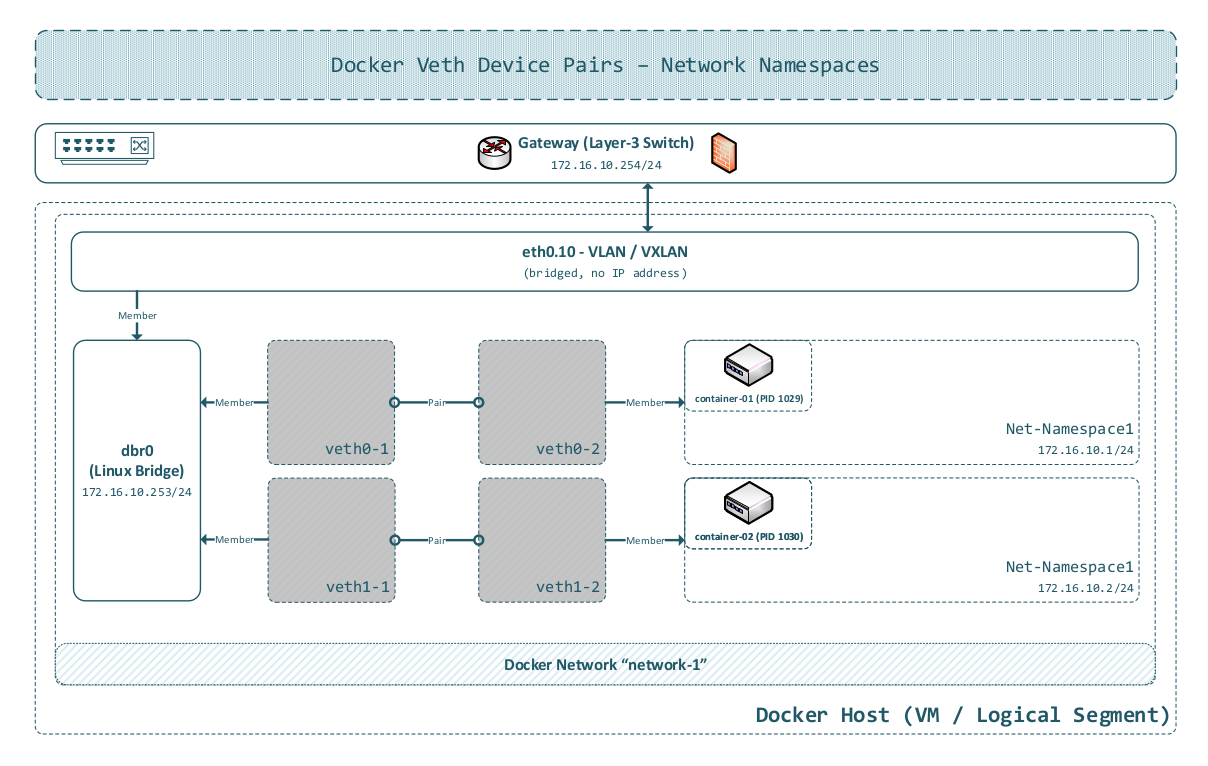
Virtual Ethernet (veth) Pairs
Docker employs Linux Virtual Ethernet (veth) devices to connect containers to bridges.
- Docker creates a veth pair when initiating a container
- One terminus is placed into the container’s network namespace (appears as
veth1a2b3c4d) - The other terminus remains on the host (named like
veth1a2b3c4e)
Network Namespaces
Each container operates within an isolated network namespace, providing separate:
- Network interfaces
- Routing tables
- Firewall rules (iptables)
- Network stack
Docker stores network namespace references in
/var/run/docker/netns/, but they are not visible to standard tools by default.Technique: Create a symbolic link to expose them:
sudo ln -s /var/run/docker/netns /var/run/netnsSubsequently,
ip netnscommands can be utilised to inspect Docker network namespaces:ip netns list
Pure Linux Networking Implementation
Critical insight: Docker does not modify packets whatsoever.
All networking is handled natively by the Linux kernel. Docker simply orchestrates the creation and configuration of these native Linux networking primitives.
Extension to VLAN and Layer 3 Switching
The following diagram also illustrates the straightforward nature of extending Docker networking to enterprise-grade VLAN configurations and routing to Layer 3-enabled switches.
Architectural Diagram
Management Plane Separation
Advanced deployments frequently necessitate separation of data and management traffic. This objective is achievable by adding a second network namespace to Docker containers.
Conceptual Framework
Traditional configuration:
- Single network interface per container (eth0)
- All traffic (management and data) utilises the same network
Enhanced configuration:
- eth0: Data plane (application traffic)
- eth1: Management plane (monitoring, logging, administrative access)
Implementation Methodology
Manual veth creation:
# Create veth pair
ip link add veth-mgmt0 type veth peer name veth-mgmt1

# Add one end to container namespace
ip link set veth-mgmt1 netns <container-namespace>

# Attach host end to management bridge
ip link set veth-mgmt0 master br-mgmt

# Configure inside container
ip netns exec <container-namespace> ip addr add 10.250.0.10/24 dev veth-mgmt1
ip netns exec <container-namespace> ip link set veth-mgmt1 up
Advanced Configurations: Multi-Datacenter, VLANs, and VXLANs
Contemporary infrastructure frequently spans multiple datacenters with complex network isolation requirements. The Docker networking approach presented herein scales naturally to accommodate these scenarios.
It is particularly well-suited for virtual machine (VM) encapsulation concepts (e.g., customer-specific or even single service-based deployments).
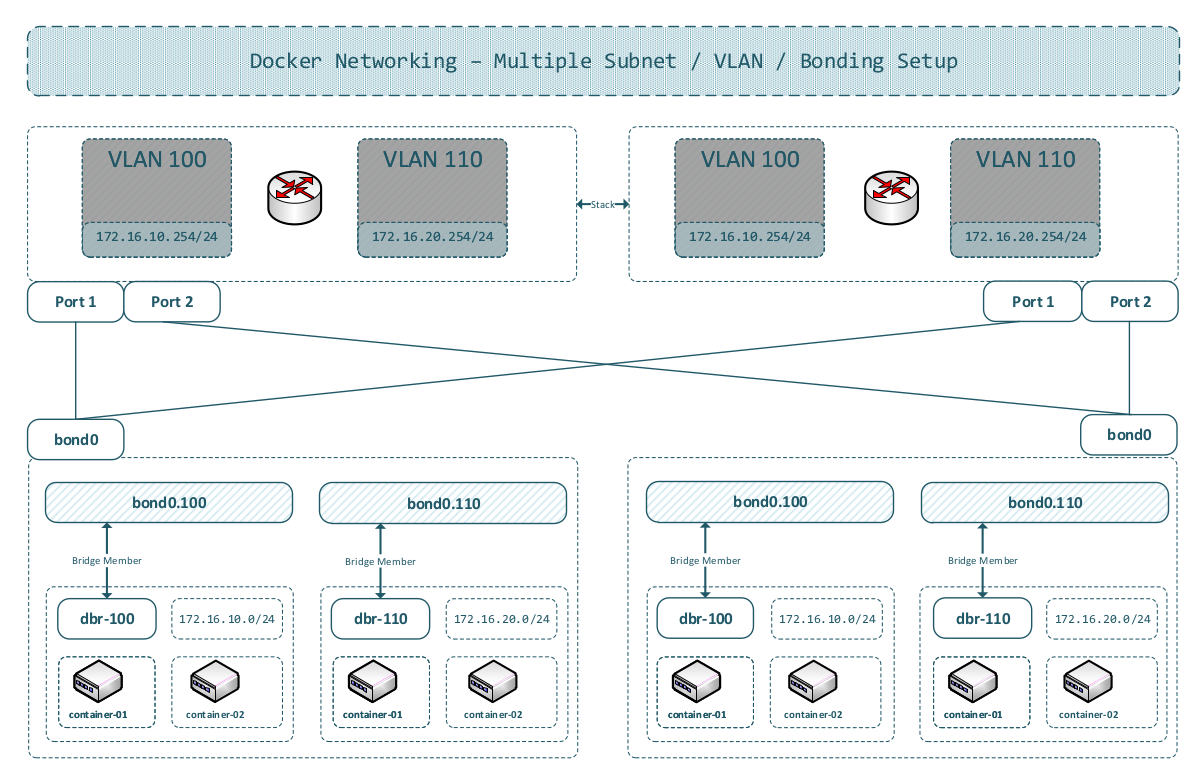
Multi-Segment VLAN Architecture
Scenario:
- Multiple datacenters (DC1, DC2, DC3)
- Layer 2 segment partitioning across locations
- VLAN/VXLAN isolation for traffic segmentation
Architectural Diagram
Preserved Key Advantages
Robust Security:
- Packet isolation at switch level (not host-based)
- External firewall appliances
- Hardware-accelerated filtering
- Layer 2 and Layer 3 security
Centralised SDN Control:
- Single control plane for all locations
- Automated provisioning
- Dynamic traffic engineering
Enabled Capabilities
Single-Point-of-Failure Elimination
Milestone: 100% Network Single-Point-of-Failure Elimination:
All current proposals presented herein still do not provide a 100% single-point-of-failure-free infrastructure; they only eliminate nearly all such vulnerabilities. Compared to current products on the market, this represents a significant difference.
For a completely single-point-of-failure-free infrastructure, new management-plane processing techniques (protocols) must be developed. This naturally presupposes a monitoring concept which guarantees timely replacement of networking hardware and components.
See https://www.der-it-pruefer.de/infrastructure/Kubernetes-Control-Plane-Architectural-Challenges, sub-chapter “Reliable Message Distribution Protocol (RMDP)”.
Centralised PKI / AAA / Net-HSM
Rather than implementing bloated sidecar patterns (separate security containers for each application):
- Centralised authentication/authorisation
- Hardware Security Modules (HSM) at network edge
- Unified PKI infrastructure
Centralised DNSSec
Rather than operating DNS resolvers in each network segment:
- Single authoritative DNS infrastructure
- DNSSEC for cryptographic validation
- Reduced complexity
Transcending the Sidecar Anti-Pattern
Contemporary microservice architectures frequently deploy sidecars for:
- Service mesh functionality (Envoy, Linkerd)
- Security (mTLS termination)
- Monitoring (agents)
Summary and Conclusions
The Deficiencies of Current Approaches
Most Docker orchestration and management systems (Kubernetes, Docker Swarm, Nomad) create network overcomplexity:
- Complex overlay networks (ubiquitous VXLAN implementation)
- iptables rules numbering in the hundreds or thousands
- Service meshes adding multiple proxies per pod
- Sidecar containers for every function
- Challenging troubleshooting scenarios
- Performance overhead
Proposed Methodology: Simplicity with Security
Core principles:
- Disable Docker iptables - Pure Layer 2 forwarding
- Direct container addressing - No NAT, no port mapping complexity
- Infrastructure-level security - Leverage external switches, firewalls, SDN
- Centralised services - PKI, DNS, monitoring at network edge
Future Directions
The IT-Prüfer team is developing SDMI (Simple Docker Management Instrumentation) - a lightweight orchestration platform implementing these principles:
- No overlay networks
- Native Linux networking
- SDN integration
- Minimal container overhead
- Production-ready simplicity
Concluding Observation
Network complexity is not a prerequisite for container orchestration. By leveraging standard Linux networking capabilities and contemporary SDN infrastructure, it is possible to construct simpler, more secure, and higher-performing systems.
The future of container networking lies not in additional abstraction layers—it is transparent integration with proven networking fundamentals.

References
SDMI Project:
[1] Simple Docker Management Instrumentation (SDMI). GitHub Repository. Available at: https://github.com/WEBcodeX1/sdmi
The reference implementation for lightweight orchestration aligned with the native Linux networking model outlined in this article.
Docker Networking Documentation:
[2] Docker Network Driver Overview. Docker Documentation. Available at: https://docs.docker.com/network/drivers/
Official documentation of Docker’s network drivers and their intended use cases.
[3] Docker Bridge Network Driver. Docker Documentation. Available at: https://docs.docker.com/network/bridge/
Reference documentation for configuring the bridge driver, including iptables integration and IP masquerade behaviour.
Linux Networking:
[4] Linux Bridge Documentation. Linux Kernel Documentation. Available at: https://www.kernel.org/doc/html/latest/networking/bridge.html
Describes kernel bridge behaviour and the bridge netfilter options referenced in this article.
[5] ip-netns(8) Manual Page. man7.org. Available at: https://man7.org/linux/man-pages/man8/ip-netns.8.html
Details network namespace management utilised when inspecting Docker container namespaces.
[6] veth(4) Manual Page. man7.org. Available at: https://man7.org/linux/man-pages/man4/veth.4.html
Reference for virtual Ethernet pairs that connect containers to Linux bridges.
[7] VLAN 802.1Q Documentation. Linux Kernel Documentation. Available at: https://www.kernel.org/doc/html/latest/networking/8021q.html
Kernel-level VLAN configuration and tagging behaviour utilised for segmented Layer 2 designs.
[8] VXLAN: RFC 7348. IETF. Available at: https://datatracker.ietf.org/doc/html/rfc7348
Specification for the VXLAN overlay encapsulation referenced in the multi-datacenter section.
SDN and Network Virtualisation:
[9] OpenFlow Switch Specification 1.5.1. Open Networking Foundation. Available at: https://opennetworking.org/wp-content/uploads/2014/10/openflow-switch-v1.5.1.pdf
Baseline SDN southbound protocol for programmable switch fabrics.
[10] Open vSwitch Documentation. Available at: https://docs.openvswitch.org/
Reference implementation for virtual switching utilised in SDN laboratories and production networks.
Related Technologies:
[11] Container Network Interface (CNI) Specification. Available at: https://www.cni.dev/docs/spec/
Defines the plugin interface utilised by Kubernetes and other orchestrators for container networking.
[12] Layer 2 and Layer 3 Configuration Guide (Cumulus Linux). Available at: https://docs.nvidia.com/networking-ethernet-software/cumulus-linux-515/Layer-2/
Practical reference for switch configuration concepts covering VLANs, bridges, and routing.